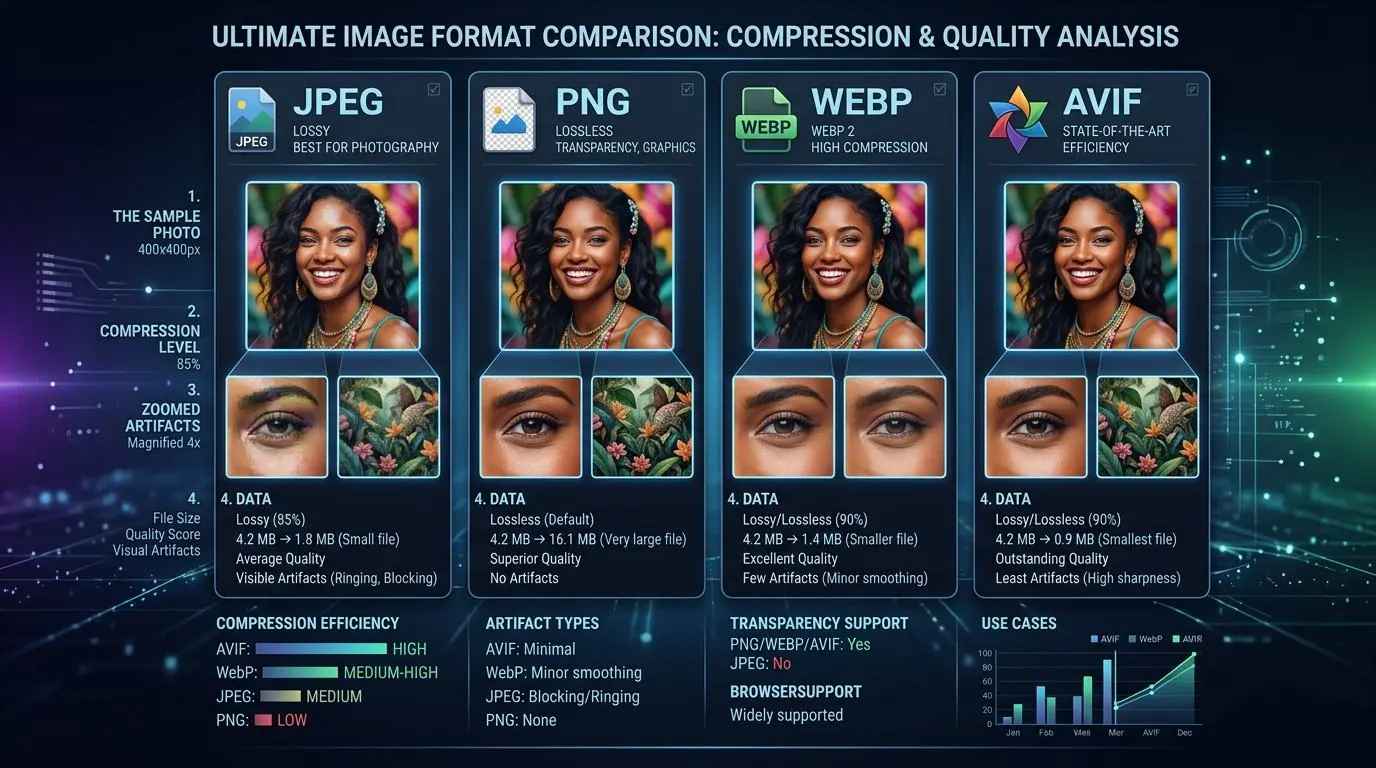
For the past five years, WebP has been the undisputed king of next-generation web image formats. Developed by Google, it offered significant file size reductions over JPEG and PNG while supporting both lossy and lossless compression, as well as transparency. But in 2026, a new challenger has achieved near-universal adoption: AVIF (AV1 Image File Format).
Backed by the Alliance for Open Media (which includes Google, Apple, Microsoft, and Netflix), AVIF promises even greater compression efficiency than WebP. But does it live up to the hype? And is it time to abandon WebP entirely? In this deep dive, we compare WebP and AVIF across file size, visual quality, decoding performance, and browser support.
File Size and Compression Efficiency
The primary reason to adopt a new image format is to save bandwidth and improve page load times. On this front, AVIF is the clear winner.
AVIF is based on the AV1 video codec, which was designed to compress high-resolution 4K and 8K video efficiently. When applied to still images, AV1's advanced predictive coding algorithms allow it to preserve detail at incredibly low bitrates.
The Numbers: File Size Savings
In our benchmark tests across a dataset of 1,000 high-resolution photographic images, we compared JPEG, WebP, and AVIF at equivalent visual quality (measured using the SSIM and DSSIM metrics):
- JPEG: 100% (Baseline)
- WebP: ~30% smaller than JPEG
- AVIF: ~50% smaller than JPEG, and ~25% smaller than WebP
For a typical 1920x1080 hero image, a JPEG might be 400KB. Converting it to WebP could reduce it to 280KB. Converting it to AVIF often brings it down to 180KB—without any noticeable loss in visual quality.
Visual Quality at Low Bitrates
Where AVIF truly shines is at very low bitrates (high compression settings). When you heavily compress a JPEG, it develops blocky artifacts (macroblocking) and color banding. When you heavily compress a WebP, it tends to blur out details, making the image look soft or "smudged."
AVIF, however, maintains sharp edges and realistic textures even when compressed aggressively. It introduces a subtle, film-like grain rather than blocky artifacts or extreme blurring. This makes AVIF exceptional for large background images or hero banners where you want to keep the file size under 100KB without the image looking degraded.
Color Depth and HDR Support
WebP is limited to 8-bit color depth (standard dynamic range). AVIF supports 10-bit and 12-bit color depth, making it fully compatible with Wide Color Gamut (WCG) and High Dynamic Range (HDR) displays. If you are a photographer showcasing vivid landscapes or a brand relying on precise color reproduction, AVIF can capture a wider spectrum of colors than WebP.
Decoding Speed and CPU Usage
The tradeoff for AVIF's incredible compression is computational complexity. Encoding (creating) an AVIF file takes significantly longer than encoding a WebP or JPEG. While this is primarily an issue for servers or content creators, decoding (viewing) the image affects the end-user.
In 2026, most modern smartphones and desktop CPUs have hardware acceleration for AV1 decoding. For these devices, AVIF images render instantly with minimal battery drain. However, on older devices (pre-2022) without hardware decoding, AVIF must be decoded via software. This can lead to slightly slower render times compared to WebP, which is heavily optimized and less computationally demanding.
Verdict: WebP is still slightly faster to encode and decode on legacy hardware, but AVIF's smaller file size often offsets the decoding delay by downloading much faster.
Browser Support in 2026
For years, AVIF adoption was hindered by a lack of support in Apple's ecosystem (Safari and iOS). However, as of iOS 16 and macOS Ventura, Apple added full AVIF support. Today, in 2026, the browser landscape looks like this:
- WebP Support: ~97% of global users (Supported natively in Chrome, Safari, Firefox, Edge, iOS, and Android).
- AVIF Support: ~92% of global users (Supported natively in Chrome, Safari, Firefox, Edge, iOS, and Android).
While AVIF support is not quite as universal as WebP, it has crossed the critical threshold where it can be used safely in production.
How to Implement Safely
To get the benefits of AVIF without breaking your site for users on older browsers, you should use HTML's <picture> element to provide fallback formats:
<picture>
  <source srcset="image.avif" type="image/avif">
  <source srcset="image.webp" type="image/webp">
  <img src="image.jpg" alt="A beautiful landscape">
</picture>
In this setup, modern browsers will download the ultra-lightweight AVIF. Slightly older browsers will fall back to WebP. Legacy browsers will download the standard JPEG.
The Verdict
If you have an automated image pipeline or use an image CDN, you should absolutely be serving AVIF in 2026. The bandwidth savings and visual quality improvements over WebP are undeniable.
However, if you are manually saving images for a blog or small website and don't want to deal with <picture> tags, WebP remains the safest, most reliable "single format" choice, offering a great balance of compression, speed, and 97% compatibility.
