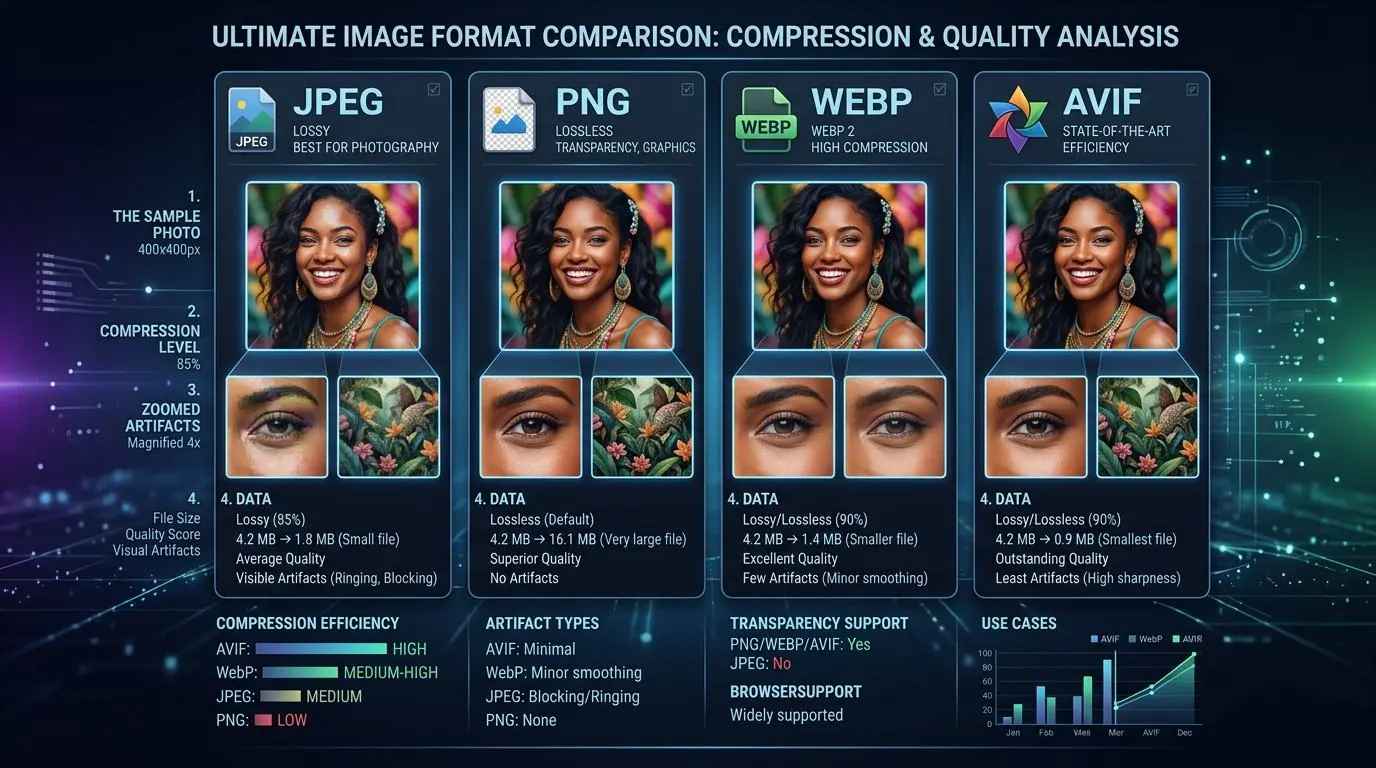
Choosing the right image format is no longer just a matter of picking JPEG for photos and PNG for graphics. The web has evolved, and the formats we use to deliver visuals have become highly specialized. Using an outdated format in 2026 can severely impact your website's performance, cost you money in bandwidth, and lower your search engine rankings.
In this guide, we will compare the four major formats used on the web today: JPEG, PNG, WebP, and AVIF. We'll look at the technical differences, browser compatibility, and provide a clear framework for deciding which format to use for any given scenario.
The Legacy Formats: JPEG and PNG
Despite being decades old, JPEG and PNG still hold a massive share of the web due to their universal compatibility and simplicity.
JPEG (Joint Photographic Experts Group)
Introduced in 1992, JPEG revolutionized digital imaging by introducing lossy compression. It discards visual information that the human eye struggles to perceive, resulting in tiny file sizes.
- Pros: 100% universal compatibility. Excellent for complex, colorful photographs.
- Cons: Does not support transparency (alpha channel). Suffers from blocky artifacts at high compression levels. Inefficient compared to modern codecs.
- When to use in 2026: Only as a fallback format for extremely old browsers or systems that cannot parse modern formats (e.g., legacy email clients).
PNG (Portable Network Graphics)
PNG was designed for the web as a lossless format that supports full transparency. If you save a PNG and open it again, zero data is lost.
- Pros: Supports crisp, clean transparency. Perfect for logos, icons, and graphics with sharp edges and solid colors.
- Cons: File sizes are enormous when used for complex photographs.
- When to use in 2026: For small icons, logos, and graphics where absolute pixel perfection is required and file size is negligible. Do not use PNG for large photographs.
The Modern Formats: WebP and AVIF
To solve the bloat of JPEGs and PNGs, tech giants developed formats based on video compression technology. These formats offer both lossy and lossless compression, plus transparency.
WebP
Developed by Google, WebP has become the de facto standard for web images in the mid-2020s. It offers roughly 25-35% smaller file sizes than JPEG at equivalent quality.
- Pros: 97%+ global browser support. Supports transparency. Offers a lossless mode that is often smaller than PNG. Fast decoding speed.
- Cons: Slightly softer at extreme compression levels compared to AVIF.
- When to use in 2026: WebP should be your default format for almost all web imagery. It offers the best balance of compression and near-universal compatibility without requiring complex fallback code.
AVIF (AV1 Image File Format)
AVIF is the bleeding edge. Based on the AV1 video codec, it offers unparalleled compression, beating WebP by another 20-30% on average, particularly at low bitrates.
- Pros: The smallest possible file sizes. Excellent detail retention. Supports Wide Color Gamut (10-bit/12-bit) and HDR.
- Cons: Slower to encode (save). Browser support is around 92% globally, meaning you still need fallbacks for older devices.
- When to use in 2026: For highly optimized web applications, hero banners, and large background images where saving every kilobyte matters. Must be implemented using the
<picture>element to provide WebP/JPEG fallbacks.
Format Comparison Matrix
| Format | Type | Transparency | Best For | Browser Support |
|---|---|---|---|---|
| JPEG | Lossy | No | Legacy fallback | 100% |
| PNG | Lossless | Yes | Logos, hard edges | 100% |
| WebP | Both | Yes | General web use | ~97% |
| AVIF | Both | Yes | Maximum compression | ~92% |
Implementing a Conversion Strategy
If your website is currently filled with JPEGs and PNGs, don't panic. You don't need to manually re-export everything from Photoshop.
You can use a bulk processing tool to convert your entire image directory from JPEG to WebP in one pass. Aim for a WebP quality setting of around 80-85%. This typically yields a file that is visually indistinguishable from a 90% JPEG, but at half the physical file size.
Summary
The format wars are largely settled. For 99% of web projects in 2026, WebP is the sweet spot. It provides massive performance gains over JPEG and PNG while being natively supported by every modern browser and operating system. If you want to push the absolute limits of performance, implement AVIF with WebP fallbacks.
